
Abstract: a comparison of writing a plugin script by hand versus using AI. After immense pressure, I try using Cursor to write a plugin script to list the nodes and edges in a Shared Tasks Graph. Using AI turned out to be a bit faster and was a lot less painful than I’d imagined.
Our two most recent engineer trainings have focused on AI. In these trainings, there has been some disappointment expressed at the lack of AI usage among our engineers in their day-to-day work tasks.
The Maintenance Theory
As one of those disappointing engineers, I personally like the theory that the lack of AI adoption is related to “day-to-day work tasks” tending more towards maintenance than code generation. I think that AI really could generate boiler plate code faster and likely more accurately than I could. I even think it could generate non-boiler-plate code faster than me, although I have some skepticism on the accuracy.
But I’m not usually generating boiler-plate code. I’d say most of my time is spent navigating code, followed by code comprehension, and ending with writing code. Can I say that the demonstration we got of AI’s ability to search through a large code base was less than convincing?
The Hole
With this happy theory in mind, I was ready to continue my normal, AI-free work life. Unfortunately, Heidi pointed out a hole in my world view. I do occasionally write plugins, and a single file plugin script does fall under my category of times when I think AI could be useful. She said rather than waiting to enjoy the epic showdown between the AI users and the senior parser engineers racing to add a language to Understand, I should compare my own time to write a plugin script with AI’s time.
Well, if I’m stuck trying AI, I might as well do it right. After all, if I honestly give it a try, I can at least defend myself at the next engineering training. Or, if I’m really lucky, maybe our next engineering training meeting will finally be on a different topic.
The Hypothesis
When not piggy backing off convenient (and reasonable) theories, I have two main reasons I haven’t tried AI.
The first is that I really don’t think it will save me specifically time. It feels like there’s a lot of overhead in getting things set up. There’s a lot of different AI providers and every person seems to have their own opinion on which one is best and when. So, even if things are faster once everything is set up, it would have to be amazingly faster to make up for that initial overhead any time soon.
The second reason is mental health. This is probably biased by watching people attempt to use voice command. It doesn’t even seem age or gender specific. My youngest sister, who is perfectly capable of using technology, still argued with Alexa for an embarrassing amount of time attempting to get it to play a playlist. My impression of AI has been similar. Working with AI sounds about as satisfying as arguing with a toddler and both toddlers and AI have a lot more stamina for it than I do.
The Script
For this test, I need a plugin script project that I can compare times with. There’s a customer who is using the Shared Tasks plugins to ensure safe access to shared variables. However, the code being tested uses function pointers which are dynamic. So, function pointers involved in shared variable access have to be manually checked to see which of the possible functions are actually called. The general request is to make it easier to find the function pointers that must be validated and to track which ones have been validated.
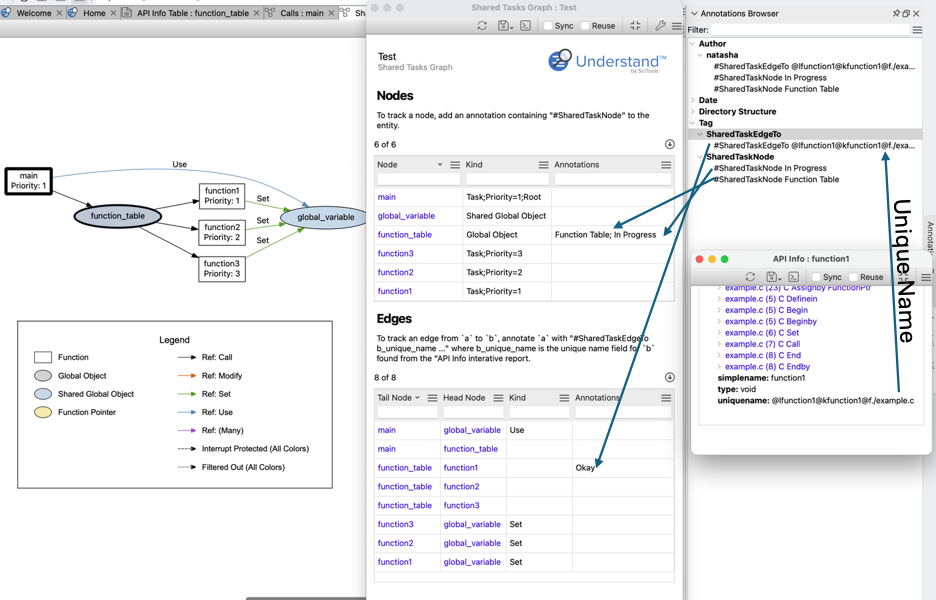
My plugin will be an interactive report that lists the nodes and edges in the shared tasks graph. Interactive reports allow filterable tables, which will allow finding the relevant nodes and edges. For tracking, I’ll define an annotation scheme and display matching annotations in the table. Annotations are persistent, shared, and readable and writable from the API, making them ideal for this scenario.
Since the Annotation Browser already groups things by “#tag”, I’ll use “#SharedTaskNode” and “#SharedTaskEdgeTo” to mark annotations that should appear for nodes and edges respectively. For an edge, I need both the source and destination entity. The source entity will have the annotation, and the destination entity must be written into the annotation. To keep it as stable as possible across source code changes, I’ll use the destination entity’s unique name. It’s accessible from the “API Info” interactive report that’s enabled by default in Understand.
The Results
I wrote my version of the script first. It took about 1.5 hours to write the script and an additional 0.5 hours to write the description and make an image. Some of the time for my script included defining the annotation scheme described above and creating a sample for testing. My final script is 279 lines long and can be viewed here.
The AI version of the script took a little over 1 hour to create. This includes the time to download Cursor (which was demonstrated in the training), create a login for it (wait, I have to create a login? Ouch), point it at a copy of the Understand’s plugin repository (no way is it touching my real copy) and adding a folder with the Python API documentation (after all, I’m not trying to sabotage the process). Oh, and I had to figure out how to tell Cursor that .upy files should be treated as Python in the settings. That one’s probably on me for barely knowing Visual Studio Code either. Everything I gave cursor is public access so I won’t worry about privacy settings for now.
Initial AI Result
I thought my initial prompt was a little optimistic. It was:
Create a new interactive report in Solutions/sharedTasks with the name “Shared Tasks Graphs AI”. The interactive report should have the same options as Solutions/sharedTasks/sharedTasksGraph.upy and generate the same data. The nodes created should be reported in a table with the node name, node kind, and a column for annotations. The edges should be listed in a seperate table with columns for the source node name, destination node name, edge kind, and annotations.
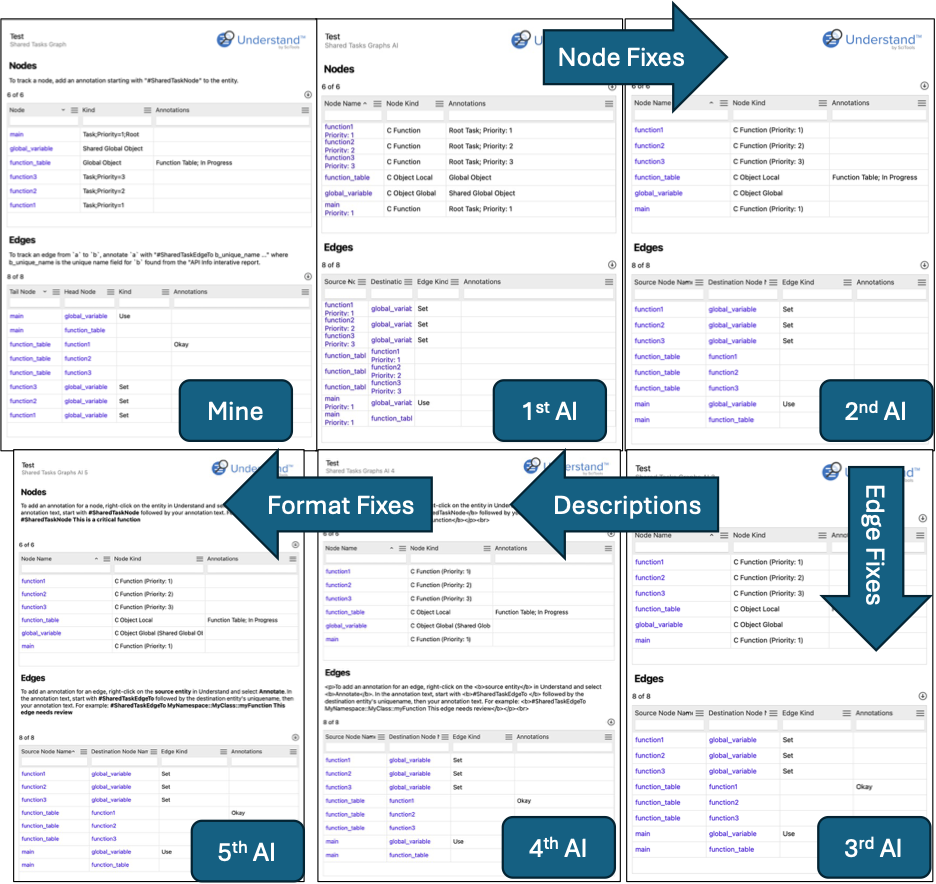
But I was surprised when AI’s initial version did in fact create a valid interactive report that even had filtered tables with the requested columns and was showing the right nodes and edges in the table.
Improvements
It took another prompt to move a common function into the common file which is something I’d done in my real repository for my version. AI even removed the now unneeded import, which I’d forgotten to do.
I used the next two prompts to give the annotation scheme for nodes and edges respectively. That worked impressively well, but I lost the information on whether a node was a shared global object or a function pointer. So, the 5th prompt added that back in and added help text and descriptions.
AI did come up with a helpful description for making annotations, but it sent it all as html when IReport.print() only accepts plain text. So the final prompt was needed to tell it to use the report’s formatting functions instead of html.
AI’s final result is 381 lines of code. The prompts and intermediate results are available in the following zip file.
The Discussion
I’m sorry Heidi. Your confidence that I would be faster than AI was flattering, but AI was faster even counting the setup time.
Going back to my two initial concerns, AI is sufficiently fast that the overhead of setting it up wasn’t a big deal. My second concern also proved unfounded. My experience was not the “arguing with a toddler” experience I expected. AI followed directions really well and even managed to learn details like what makes an interactive report plugin different from a graph plugin.
I do think the extra half hour I spent on the description of my plugin was worth it, though. After all, I fixed the spelling error in the first sentence of the first paragraph and AI didn’t. I have to claim my small victories, even if I probably made the initial spelling error. Also, I have no idea how to tell AI to generate a screenshot for documentation, so that part of my description is better too.
The Conclusion
So, I guess the big question is, would I use AI again? For plugin writing, probably. If I remember to and if the script seems suited to it. This script was very closely related to an existing script so it seemed suited to AI.
In contrast, I would not use AI for scripts like the Cognitive Complexity Metric plugin script because it involved a lot of decisions on how to map the published definition to the information Understand provided. I’m much more comfortable giving AI directions than I am letting AI make design decisions.
It’s also worth noting that design decisions far exceed the amount of time to write the script whether it was me writing it or AI. I spent at least four hours going through the customer request to really understand it and design this solution before even starting to write code.
Still, I think Heidi won this one. I actually tried AI and I didn’t hate it.