
AI doesn’t actually understand your code.
It guesses.
Unless you give it a way to call Understand.
When Kevin and Heidi told me that our Japanese partner TechMatrix had built an MCP server for the Understand API—something that lets AI call real Understand functions—I said, “That sounds cool,” while thinking about how cool Understand already is.
They heard, “Great, I’ll build a full MCP server.”
This article explains how that happened—and how you can do it too.
Quick Start
Getting MCP running on your local machine will take about 5 minutes. It requires installing FastMCP in a compatible Python environment, configuring the necessary Understand environment variables, and registering the server with your AI client (such as Cursor) via an mcp.json file. The server is started with a specific Understand project file, which remains open for the duration of the MCP session.
For step-by-step instructions, platform-specific details, and a complete Cursor example, see the full setup guide on our support site. Now that the setup is out of the way, on to the story.
Building the MCP Server
K&H had just told me to write an MCP server, and my attempts to clarify my “that’s cool” comment failed. Writing an MCP server was on my to-do list and I hadn’t even tried using AI at all yet. Now that I have tried AI, I’ll admit it can be a little cool. But AI is still second on my list of “Understand features I’m trying to avoid working on”, right below working with web code.
The first step to writing an MCP server was seeing what TechMatrix had done. Their blog article is here. Sadly, my Japanese is still only at the level of picking out random words while watching anime. But whatever Safari did to translate the article into English worked great. I did have to switch back to Japanese to get the download link for their script though.
TechMatrix used a library called FastMCP to wrap a few functions from Understand’s Python API. I’ll need to create my own MCP server so that it has more functionality and to have it in English. But, following TechMatrix’s route of using FastMCP, all I need to do is create some FastMCP annotations for the existing Understand Python API.
Design Decisions
Well, creating a bunch of glue code between two documented APIs definitely falls under the category of scripts that seem suited to AI. After all, the first AI engineering training presenter told us that the language AI speaks best is AI. So I might as well let AI generate what it prefers.
But I still need to make a few design decisions. After all, it’s not like a server can hold onto every Understand Python API object. The first design decision was to make the Understand project an argument to the server. So, the server holds onto the understand.Db object and calls into the server don’t need to determine what the project is or pay the overhead of opening and closing it.
Now, how to remember an Understand entity? The two options are the understand.Ent.id() or the understand.Ent.uniquename(). The entity id will change anytime the project is analyzed but lookup by id is comparatively fast. In contrast, the unique name allows finding the same entity after an analysis but lookup is very slow. An Understand project can’t be analyzed while it is open and the MCP server keeps the database open. So I’ll use the entity id for all the server methods that access an entity.
Most other Understand Python API objects can be serialized. Specifically, references, annotations, violations, lexemes, and control flow nodes are all essentially data classes anyway. But architectures have some calculations, so they need an identifier. For architectures, the only option is the longname.
AI Code Generation
With the design decisions out of the way, I’ll have AI generate all the boring boiler plate code. I added FastMCP documentation to my plugins repository + Python API documentation setup described here. Then I used prompts like:
Create mcp tool functions for the following understand.Ent methods. Each mcp tool function should take an ent_id as an argument and use db.ent_from_id to retrieve the understand.Ent object. The understand.Ent.methods that should be wrapped are: comments, contents, ents, file_type, freetext, ib, kindname, language, library, longname, name, parameters, parent, parsetime, relname, simplename, type, uniquename, and value.
Things were going great until I hit the usage limit of a free Cursor account. Noo! I can’t be one of those people who uses AI so much I need to pay for it. I don’t like AI, I don’t like AI, I don’t like AI … right? I’ll just generate the boiler plate myself. Except, I’ve been testing the MCP server in Cursor and I can’t test it if I’ve hit the usage limit. I made my shameful walk to Kevin to ask for a paid Cursor account.
Testing the Server
So, a few hours later I have my complete MCP server. It’s about 1,500 lines of code and wraps all the functions I wanted it to. Here’s AI’s list of how it compares to the Understand Python API. Note that I purposely did not add any functions that modified things, which includes the draw methods because they create files.
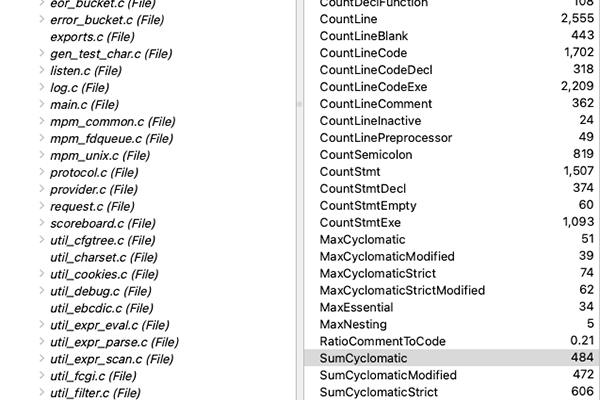
Let’s see if it works. I’ll ask “What functions have the highest cyclomatic complexity?” in my test project (configured with the mcp.json file shown at the beginning of the article). Here’s the full response.
From the full response I can see that it is in fact talking to the Understand server and successfully found the functions in the project (49 according to Understand, but it could vary a little depending on the kind string used) and got the Cyclomatic Complexity metric for them.
How does it compare to Understand?
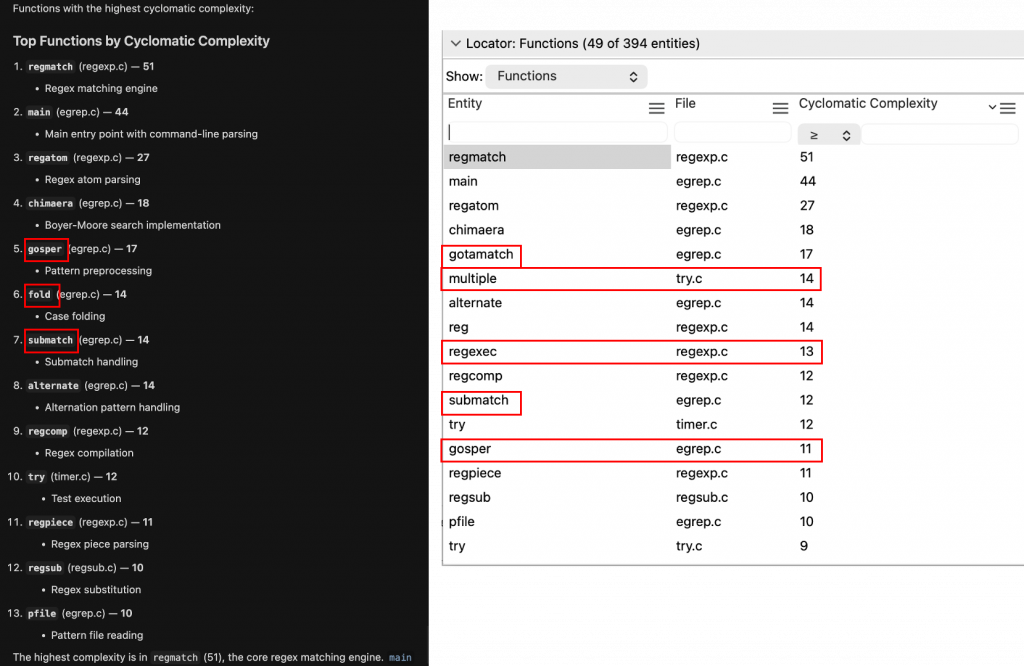
The first four entries are right! Nice. After that it starts to get a little confused: some of the wrong entities are attached to the cyclomatic complexity values for 5–7, and a few entities were skipped entirely.
I still consider it a success though. After all, it’s talking to the MCP server and getting real cyclomatic complexity values from Understand. Even with a few rough edges, that’s a big step forward—and a solid foundation to build on. If you’re curious, try it out on one of your own projects and see what kinds of questions you can get AI to ask.